http://www.omnisecu.com/cisco-certified-network-associate-ccna/what-is-layer-2-switching-loop.php
Wednesday, January 18, 2017

Friday, January 6, 2017
how to replace one line with two lines in notepad++

https://techably.com/replace-multiple-lines-notepad/10458/

Wednesday, January 4, 2017


how to filter last days of months in excel
how to filter last days of months in excel
https://www.youtube.com/watch?v=MEH7iReCZA8
=AND(WEEKDAY(A3,2)<6,MONTH(WORKDAY(A3,1))<>MONTH(A3))
https://www.youtube.com/watch?v=MEH7iReCZA8
=AND(WEEKDAY(A3,2)<6,MONTH(WORKDAY(A3,1))<>MONTH(A3))
Monday, January 2, 2017
Finding your processes to learn how to determine the job numbers
`Finding your processes' to learn how to determine the job numbers of your background processes.
http://infohost.nmt.edu/tcc/help/unix/suspended.html
http://infohost.nmt.edu/tcc/help/unix/ps.html
- To find the job numbers of all the background jobs you are running, type:
% jobs
The job numbers will be shown in square brackets ([]), followed by the notation ``Stopped'' (for suspended jobs) or ``Running'' (for jobs that are still executing). - To find out all the process ID numbers of processes you are running, type:
% ps -gx
Here is an example of output from this command:PID TT STAT TIME COMMAND 12030 p5 S 0:01 -csh (csh) 12068 p5 T 1:46 emacs foo 12788 p5 R 0:00 ps -gxThe first column is the process ID. The second column tells what terminal is controlling it (in this case,ttyp5). Next comes the current status (S for sleeping, T for stopped, R for running). The next column tells how much time it has spent.
Resuming a suspended process
http://infohost.nmt.edu/tcc/help/unix/fg-bg.html
- The
bgcommand can be used to resume a suspended process in the background. When used with no arguments, thebgcommand will continue the last suspended job. To resume job number 2, you would type the command:% bg %2
- The
fgcommand resumes a suspended process in the foreground. For example, to resume job 1 in the foreground, you would type this command:% fg %1
- You can also resume suspended processes by just typing a percent sign (%) followed by the job number. For example, the command
%1would resume job 1 in the foreground. This command:% %2&
would resume job 2 in the background, because it ends with an ampersand.
Kill a suspended process as shown below:
% kill %1
Saturday, December 24, 2016
Configure Windows server to not enforce password for certificate enrollment
Please refer below link:
http://www.petenetlive.com/KB/Article/0000947


http://www.petenetlive.com/KB/Article/0000947
NDES Disable Password Requirement.
I've read a few blogs and articles that say;
"There is no way for Cisco devices to supply the required password to enroll with NDES/MSCEP, so you need to disable the requirement for a password."
This is NOT TRUE, however the whole point of issuing certificates via your PKI infrastructure, is that it can scale dramatically. If you are creating passwords and embedding those passwords in all your enrollments, it can get a little unwieldy. So it may be sensible to remove the password requirement.
1. Windows Key+R > regedit {Enter} > Navigate to;
HKEY_LOCAL_MACHINE > SOFTWARE > Microsoft > Cryptography > MSCEP > EnforcePassword > EnforcePassword
To disable change the value to 0 (zero).

Below you can see the difference, with the password requirement enforced, and without.
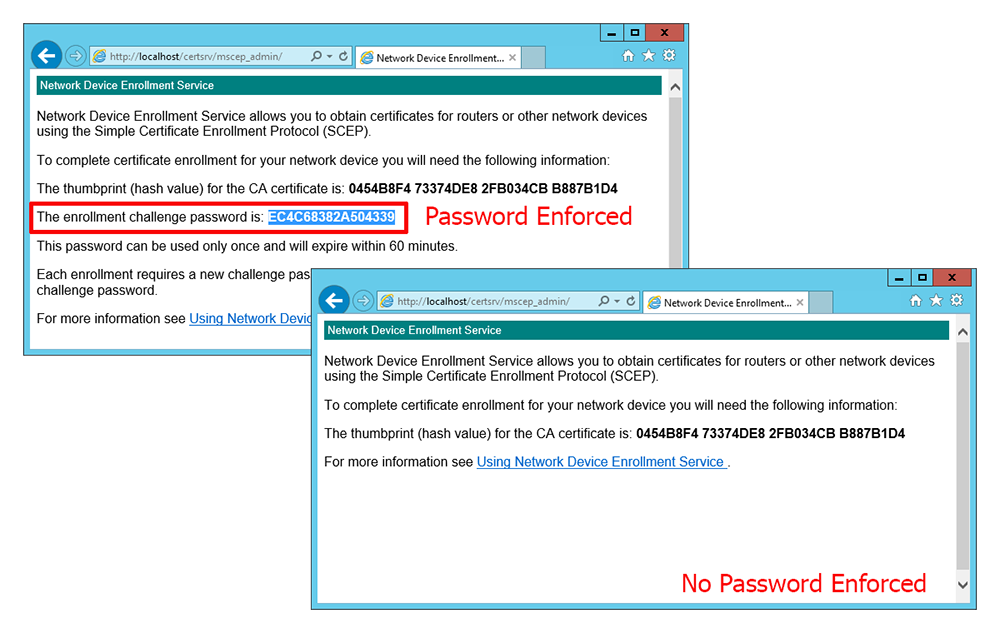
2. Restart the Certificate Services Service;
net stop certsvc net start certsvc

Tuesday, December 13, 2016
Windows server installation
Windows 2008 Enterprise CA NDES Installation with SCEP on Cisco Router: https://youtu.be/387OccoWDQQ
Automate certificate management for a local computer: https://youtu.be/0UXZ-6DEPsA
OCSP : http://www.vkernel.ro/blog/installing-and-configuring-a-microsoft-online-certificate-status-protocol-ocsp-responder
https://www.youtube.com/watch?v=TAwhvllLB34
https://www.youtube.com/watch?v=jRVCDsN3rf8
Automate certificate management for a local computer: https://youtu.be/0UXZ-6DEPsA
OCSP : http://www.vkernel.ro/blog/installing-and-configuring-a-microsoft-online-certificate-status-protocol-ocsp-responder
https://www.youtube.com/watch?v=TAwhvllLB34
https://www.youtube.com/watch?v=jRVCDsN3rf8
Use below URL to get the "enrollment challenge password" to be used during certificate request:
https://10.105.41.153/certsrv/mscep_admin/
Subscribe to:
Posts (Atom)